Increased call volume to the bank's hotline due to questions about application statuses

Analysis of the problem and presentation of proposed solutions considering the business perspective
Sector
Financial
Problem
Increased call volume to the bank's hotline
Client
Bank
Solution
Implementing changes in the user interface
Business goal
Reduce the number of phone calls
My role
UX Designer
Machineria app mockup
Problem analysis Problem solution Business perspective

Understanding the problem

Customers can check the status of their application in the browser or app. This information is available in their account under the Applications section in Transfers and Applications screen. Despite this guidance, many people still decide to call the hotline.


Two customer service agents wearing headsets discuss information at a desk with a laptop.
xmlns="http://www.w3.org/2000/svg" width="24px" height="24px" viewBox="0 0 24 24">

Analysis of the current solution

Interface element showing applications with submission date, type, number, and current status.
The current solution ONLY informs the user about the current status of the application.

Application statuses

  • Draft version

    When your application was saved in application during its completion.

  • Accepted for processing

    When the application has been given by a formal process, verified, and accepted for processing.

  • Entered

    When you or another user filled out and saved the application, but authorized person has not yet signed it.

  • Cancelled

    When the user or appropriate person cancels the application.

  • In approval process

    When the application is awaiting signature or authorization according to the approval scheme.

  • Completed

    When the requested application has been reviewed and executed.

  • Approved

    When the application has been signed by authorized individuals (or their representatives), according to the approval scheme, but has not yet been sent.

  • Rejected

    When the application has not been fulfilled for some reason.

Hypothetical causes of the problem

  • Lack of trust in the system

    A user who doesn't trust the online system may opt for phone contact to confirm receipt of their application or to get additional information.

  • Lack of awareness of the number of process stages

    A user who doesn't know how many stages are in the process may contact the hotline to inquire about the status of their application.

  • Intention to influence the pace of actions

    If a user believes their application should be treated as a priority, they may try to influence the pace of bank employees' actions by contacting the hotline.

Possible solutions to the problem

"It started with a dilemma about words, and ended with a completely rewritten screen content and a new page layout."
(own translation)

UX writing. Moc języka w produktach cyfrowych Wojciech Aleksander

Fortunately, complex solutions aren't always necessary.

Sometimes, smartly adjusting the message content may bring equally positive results.

The choice of solution depends on many factors. At this stage, various ideas can be considered.
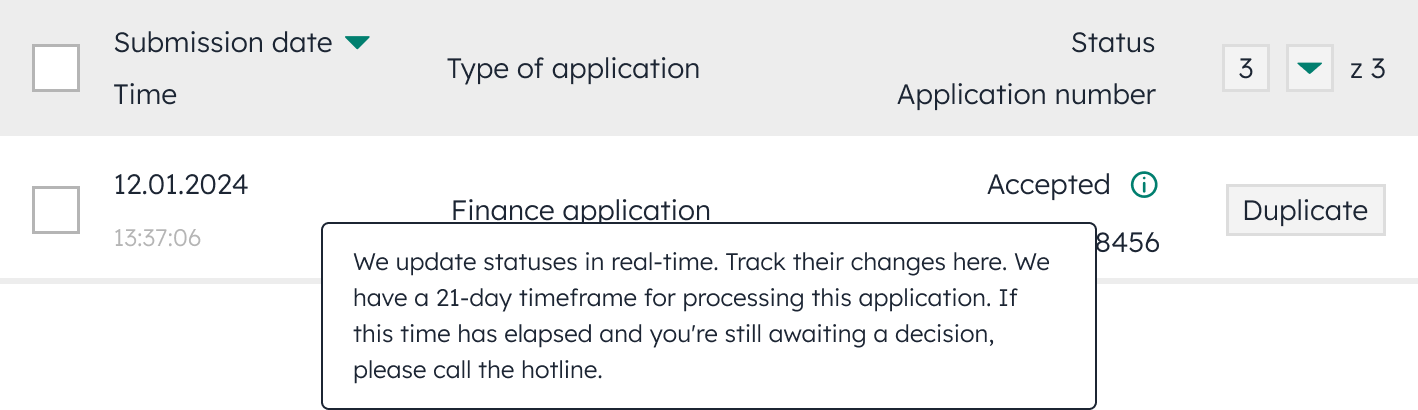
Tooltip

Interface element showing a tooltip with additional information about the application status.
Tooltips allow providing users with additional information without taking up space on the screen.

Pros

  • Provides quick access to information
  • Saves space

Cons

  • Can distract attention
  • Tooltip may go unnoticed

Notification bar

Simple language is an important element of the bank's strategy. It makes it easier to understand the content of messages.
Interface element showing a notification bar informing about real-time status updates.

Pros

  • Attracts attention
  • Is clearly visible

Cons

  • Conveys a limited amount of information
  • Is susceptible to banner blindness

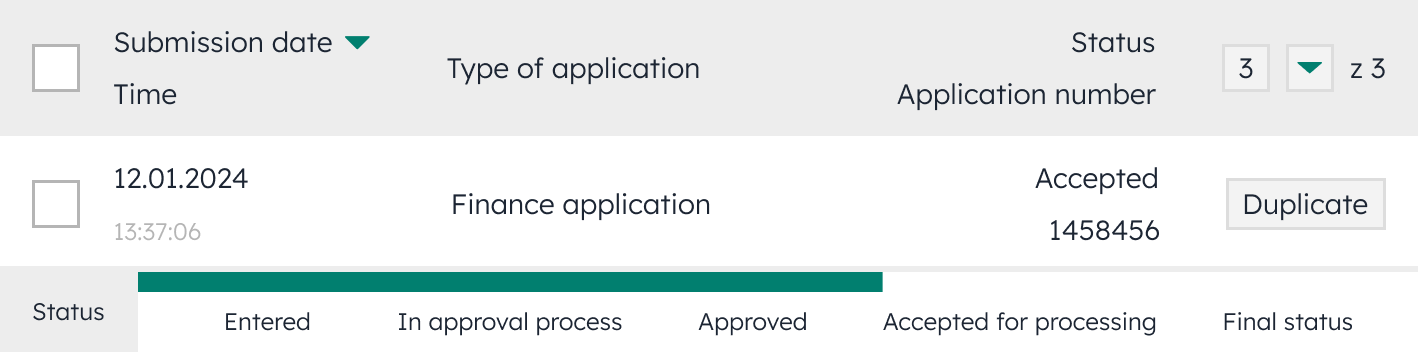
Progress bar

Interface element showing a progress bar illustrating the stages of application processing.
The progress bar can be constructed with divisions into several segments, each representing a separate stage of the process.

Pros

  • It's a visual representation of progress
  • Facilitates monitoring of changes

Cons

  • Takes up space in the table row
  • Multiple bars in the table may be confusing

Information indicating that the process is carried out in stages

Interface element showing a status indicator with the current stage number out of total stages.
Indicator that informs the user at which stage of the process they are.

Pros

  • It's a visual representation of progress
  • Facilitates monitoring of changes

Cons

  • Provides little information

Changing the font size in the column

Interface element showing a larger font size used for the status column text.
Larger font

Pros

  • Attracts attention
  • Highlights important information

Cons

  • Disrupts the appearance of the table

Splitting the column with the status and application number

Interface element showing separate columns for application status and application number.
Column separation

Pros

  • Better readability
  • Increased clarity

Cons

  • Reduction in font size
  • Takes up space

Changing the order of columns

Interface element showing the status column moved to the first position in the table.
The first column usually attracts the most attention from the user. Placing the status at the beginning of the table gives it high informational priority, which can increase the effectiveness of the message.

Pros

  • Facilitates finding important information

Cons

  • Alters the structural information of the table

Changing the color of the column

Interface element showing the status column highlighted with a different background color.
Different color for the column with the application status.

Pros

  • Attracts attention
  • Highlights important information

Cons

  • Accessibility issue for color-blind individuals

Changing the color and bolding the font in the column

Interface element showing the application status text in bold, colored font.
Different font color and bolding

Pros

  • Attracts attention
  • Highlights important information

Cons

  • Accessibility issue for color-blind individuals

Hotline message

If you want to find out the status of your application, log in to your account on the browser or app. You can check its status in the Applications module on the Transfers and Applications screen.
Proposed message

Pros

  • Provides quick access to information
  • Directs to the specified location

Cons

  • Can increase frustration

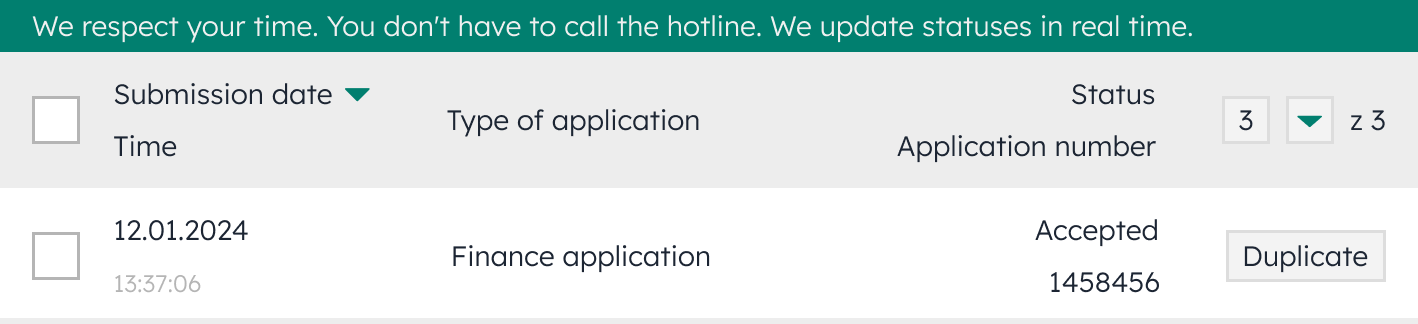
Field with information explaining what each status means

We respect your time.

You don't have to call the hotline. Check what the application statuses mean.

  • Draft version: saved, in progress.
  • Entered: filled out and saved, but not signed.
  • In approval process: awaiting signatures from authorized individuals.
  • Approved: signed, but not yet sent.
  • Accepted for processing: signed, submitted, and accepted for execution.
  • Cancelled: the user opted not to submit the application.
  • Completed: checked and executed.
  • Rejected: the application could not be processed.

Pros

  • Attracts attention
  • Highlights important information
  • Explains the application statuses

Cons

  • Takes up space on the page
  • Susceptible to banner blindness

Pop-up appearing after submitting an application

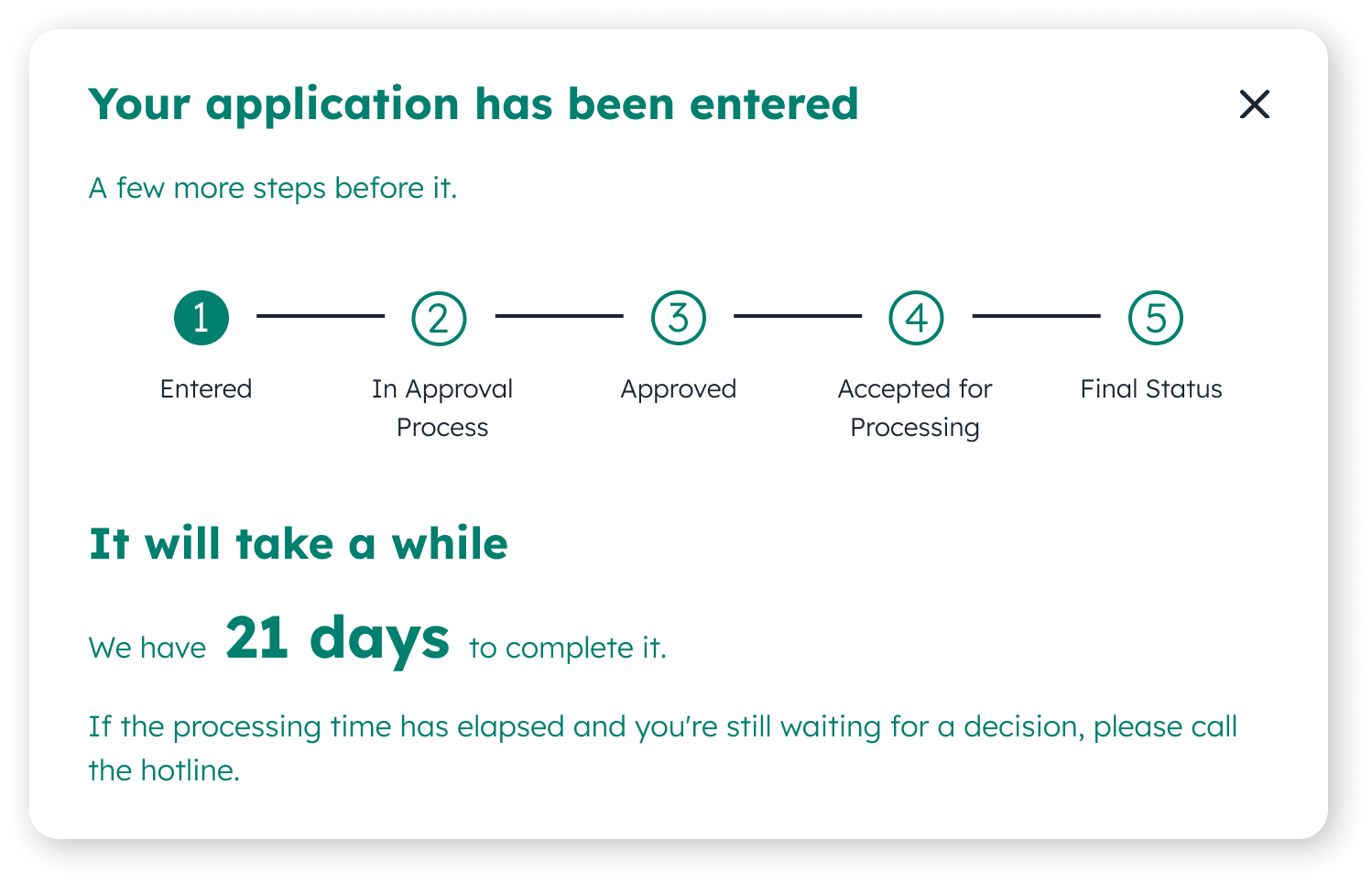
Visualizing the application statuses step by step helps the user understand the stages of the process.
Pop-up with application progress stages and processing time.
Providing the number of days needed to process the application gives a clear understanding that the process is ongoing.
Customers should call the hotline only in important situations. Instead of telling them when not to call, it's better to indicate when it is recommended or necessary.

Pros

  • Attracts attention
  • Highlights important information

Cons

  • Can increase frustration
  • Susceptible to banner blindness

A/B testing

Cause

Lack of trust in the system

Lack of awareness of the number of stages

Desire to exert influence

Variants

Variant A - new solution

Variant B - current solution

Users

Provide Variant A to roughly half of the users.

Source

The source of the tested solution is the Applications module on the bank's website.

Test

Test both A and B under the same conditions and at the same time (about 2 weeks).

Repeat

Different options can be experimented with to find an effective solution to the problem.

Winner

If the hotline traffic decreases after implementing the variant, the new solution works.

Pros

  • Improved conversion
  • Content optimization
  • Better understanding of users

Cons

  • Selecting a statistically significant user group
  • Time needed to gather data
  • Required resources

Choosing the optimal solution

Grouping solutions by implementation difficulty

Easy

  • Changing the font size in the column
  • Changing the order of columns
  • Changing the color of the column
  • Changing the color and bolding the font in the column
  • Information indicating that the process is carried out in stages
  • Notification bar

These changes require only minor code modifications.

Intermediate

  • Splitting the column with the status and application number
  • Field with information explaining what each status means

These changes are simple but require creating new user interface elements.

Advanced

  • Tooltip
  • Progress bar
  • Pop-up appearing after submitting an application
  • A/B testing

These changes require complex changes to the code or user interface.


  • Hotline message

Adding a message requires changes to the hotline system.

Implementation costs of different types of solutions

Low

The costs of easy solutions are relatively low. These changes require only minor code modifications, which can be done by a single developer within a few hours or days.

Medium

The costs of intermediate solutions are higher than those of easy solutions. These changes require creating new user interface elements, which can take several days or weeks.

High

The costs of advanced solutions are the highest. These changes require complex modifications to the code or user interface, which can take several weeks or months.

Factors determining the choice of solution

Problem importance

If the problem is significant and requires a quick resolution, easy or medium solutions should be chosen.

Estimated time to solve the problem

If there is no time pressure, medium or advanced solutions can be considered.

Availability of specialists

Consider the availability of designers, programmers, and other specialists needed to implement the solution.

Choosing a solution based on problem importance

A serious problem requiring swift action

means

choosing one of the easy solutions

Worth considering

Notification bar

Users will be directly informed of what actions are not recommended.
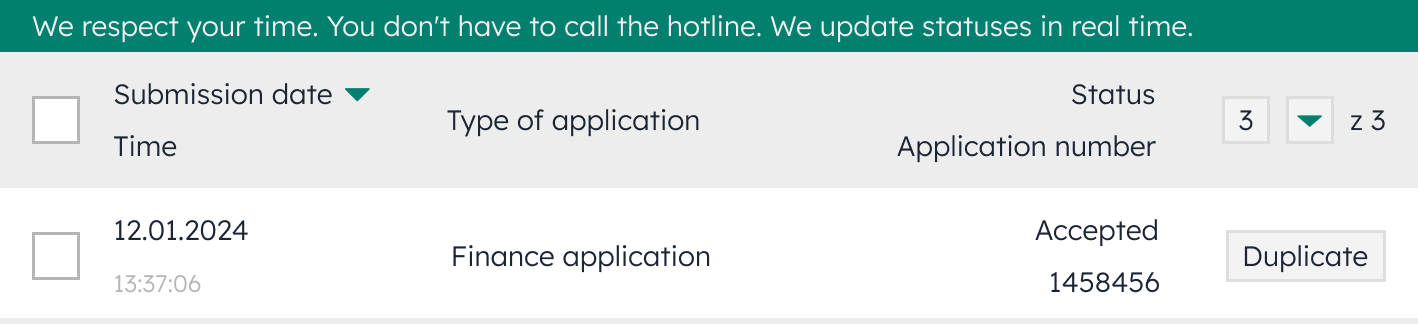
Interface element showing a notification bar informing about real-time status updates.

Non-critical problem, without time pressure

allows

choosing one of the more complex solutions

Worth considering

Splitting the column with the status and application number

Facilitates data analysis – each column will focus on one category of information.

Interface element showing separate columns for application status and application number.

Benefits of improvements

Customer satisfaction

Quick access to application status information will enhance customer experience.

Increasing customer service efficiency

Reducing the number of phone calls regarding application statuses will allow hotline staff to focus on solving other customer issues.

Operational costs

Reducing the number of phone calls may bring financial benefits by reducing customer service costs.

Brand image

Effective communication management and access to information will contribute to a positive perception of the brand as an institution that cares about customer convenience and satisfaction.

Innovations in customer service

Solving the problem by developing more advanced tools and processes can create space for further innovations in customer service.

Better use of data

Improvements can streamline the collection and analysis of user preferences data, which can help make better business decisions.

Summary

Increased hotline traffic due to inquiries about application statuses can be addressed in various ways. Choosing the right approach should consider the specifics of the business and customer needs. Effective action will improve customer comfort and service efficiency.

Bank building

What people are saying

I’m happy to answer some questions